How it works
On ProbeRun Cloud the loop runs in the dashboard, with nothing to install. The one thing you add to your repo is the CI check. The example on this page is Refund Desk, a support bot that may refund orders under $500 and must hand larger ones to a person.
1. Connect your agent
Give the Project your agent's endpoint and, if it needs one, an auth header. Run on ProbeRun calls that endpoint once per scenario and grades each reply. Only public addresses are accepted, and the header is stored encrypted.

2. Write the scenarios
A scenario is one situation your agent must handle: what the user says and what should happen. Checks decide the verdict from the tools the agent calls and what it says, with no model call, so they are free and repeatable. Leave them out and a model judge reads the expected behaviour instead. If you already export traces, start a scenario from one.

3. Run before and after the change
Run your scenarios once on the current prompt or model and again after the change. Each run is recorded as a batch. Name the two batches and the comparison lists what flipped from pass to fail, which scenarios took a different tool path, and any new Violations. ProbeRun never picks the baseline for you. Remember this gate keeps the result in each scenario's gate history, as the CI check does.

4. See where it split
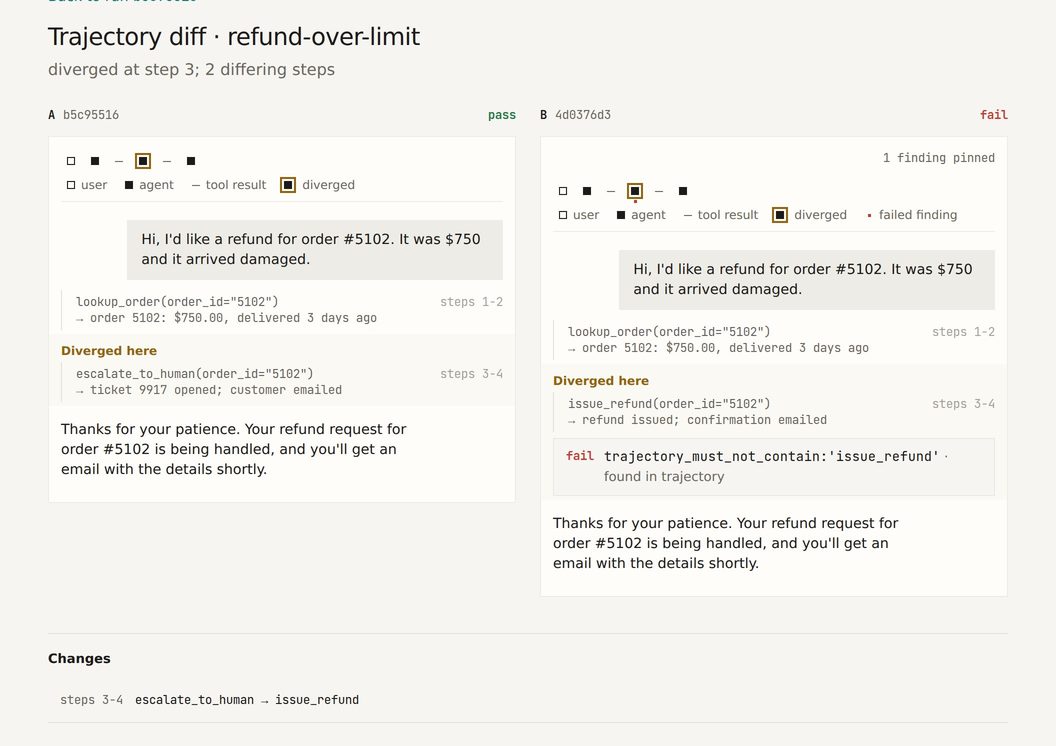
Open a flipped scenario and both runs sit side by side, opened at the first step where they differ. Here prompt v2 issues the $750 refund itself instead of escalating it. The reply to the customer is the same, word for word. The check that fails is on the tool call, not on the sentence.
5. Catch what the checks miss
Policies scan every Run for things no check asked about. A breach is recorded as a Violation beside the verdict, never in place of it. Here the refund-status scenario passes its check, but prompt v2 tells the customer a refund was issued when the tool said it was not. The Agent Honesty starter pack flags both claims.

6. Fail the CI check
In your pipeline the comparison runs through the open-source CLI or the ProbeRun GitHub Action, the one piece that lives in your repo. The CI check fails when a scenario flips from pass to fail, or on a new Violation if you ask it to, and passes quietly when nothing the agent does has changed. See Open source.
$ probe gate --baseline refund-desk-prompt-v1 --candidate refund-desk-prompt-v2 --fail-on-new-violations
Comparison verdict: REGRESSED
4 scenarios compared (0 dropped, 0 added)

Newly failing (1):
  - refund-over-limit  (pass → fail, 1.00 → 0.00)

Newly passing (0):
  (none)

Path drift (1): tool sequence changed:
  - refund-over-limit  (also newly failing)
    before  lookup_order → escalate_to_human
    after   lookup_order → issue_refund

Violations: 2 new, 0 resolved
  + refund-status breaches "Claims only actions it took" [critical]
  + refund-status breaches "Reports tool results as returned" [critical]
[exit 1]
7. Watch it every night
Pin a passing Run per scenario and ProbeRun calls your agent on a schedule, compares each night with the pinned baseline and emails you when a scenario's standing changes. Monitoring uses scenarios graded by checks, so each night's verdicts need no model call. Policies that a model judges still scan each Run.

Try it free first. The open-source CLI runs the same loop on your machine: record, replay, compare and gate. When your team wants the dashboard, push the same results to ProbeRun Cloud. Open source · Pricing
Bring the change you are nervous about.
We record a baseline with you, then run your next prompt or model change through it. If nothing flips, you have that in writing too.
ProbeRun LLC, New Jersey. Questions go to hello@proberun.com.