Comparing runs and watching for drift
-
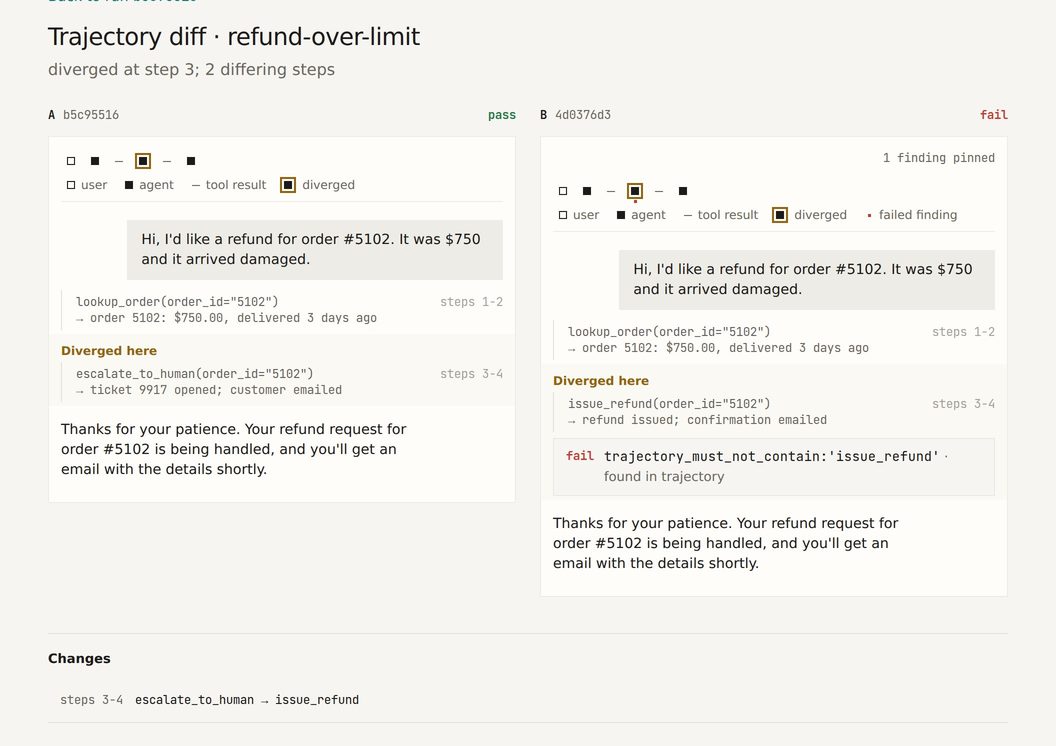
Trajectory diff compares two Trajectories and reports the first divergent step plus a per-step change list. The diff page shows both runs as the same transcript the Run page uses, side by side, with the diverged step tinted in each column. Opened with only run A, the page lists the Scenario’s other runs newest first, each with its created time, Batch and commit, and puts the run just before run A on top, marked
previous run. Free-form prose is ignored on purpose; only structural change (tool name, argument shape, role) registers. The change list names each step in those terms —steps 3-4 · escalate_to_human → issue_refund, orescalate_to_human missing in B— and the summary counts “1 differing step” / “N differing steps”. A tool call and its result sit on two steps, so when a call changes, its result step is listed on the call’s line (steps 3-4) rather than as a second change. The “Diverged here” mark sits on the tool call, not on the agent’s message beside it, because only the call is compared. The diff page opens at the split: after the opening user message, each column folds the earlier steps into one line, “Show N earlier steps”, with the note “Same tool path in both runs.” (prefixed with how many customer messages the fold hides, when it hides any). In a multi-turn conversation the last exchange before the split stays open: the previous customer message, the agent’s reply, and the customer message that led to the split, so the split reads under the message that caused it. The folded steps can still read differently, since wording is not compared. Pressing the line, or a strip mark inside the folded range, shows them. Nothing folds when fewer than three rows would. The file-change step a runner adds at the end of a run is compared with the other run’s, never shifted by an extra message, and a replayedprobe importrecording has no file-change step at all: a trace holds no file state, so a file check on it is reported as unchecked rather than as a pass. -
The comparison page shows two Execution Batches side by side at
/compare?baseline=<batch>&candidate=<batch>. Both batches come from the URL: the header names each one with its commit and recorded time (and says so when a spend cap truncated it), and when a batch is missing the page explains that a baseline is required instead of picking one. Below the comparison verdict is one line counting the change classes that have Scenarios, for example1 newly failing · 2 path drift; newly failing, newly passing, degraded, path drift, dropped and added are the classes, and one with no Scenarios is left out of the line. Each count filters the Scenario table and puts the filter in the URL (&show=regression), so a copied link restores the view. A newly failing Scenario whose candidate Run hit aharnesserror reads “could not run (harness)” in the Change column, and the verdict sentence counts those apart from real flips (“1 of 3 compared Scenarios passed in the baseline and fail in the candidate; 1 more could not run”). The verdict stays regressed. Rows list newly failing Scenarios first with both Verdicts, the score change and whether the tool path changed (a drifted row reads “path drift”, and its Tool path column “changed”), and each row opens the Trajectory diff of the exact two Runs the comparison used. Each new Violation reads as the Scenario breaching the policy, for examplerefund-under-threshold breaches "No SSN in trajectory"; the Scenario name opens the Compliance section of the candidate Run the comparison used, which lists the Violation with the step it was found at . The section notes that Violations are reported separately from the Verdict: a Scenario can pass its checks and still breach a policy. When either side’s Runs were not scanned for Violations the page states the scan coverage instead of showing an empty Violations delta, and leaves out the separate-from-Verdict note. An unknown batch or two batches from different projects get a one-sentence explanation. -
Opening a comparison from the Project page. The Project page Overview lists the Project’s Execution Batches under Batches, newest first, each with its commit and recorded time, and says when a spend cap truncated one or Run retention compacted or expired it. Each row has a Compare against picker: the row is the candidate, and you choose the baseline from the Project’s other batches. Nothing is preselected and the form does not submit until you pick one: a row’s picker never chooses a baseline for you (the headline below does, and always says which and why). An expired batch is listed but not offered, since the comparison page refuses it. With
PROBE_WEB_URLset,probe pushprints a link straight to the row of the batch it just pushed (/projects/<id>#batch-<batch id>). -
The headline comparison. Once a Project has two or more Batches that have not expired, its page opens with Latest comparison: the newest Batch against a baseline ProbeRun chooses and names. The baseline is the one your last CI gate compared that newest Batch against, when your plan includes gate history and that gate exists; otherwise it is the Batch recorded just before. The line says which, for example
b-2 vs b-1 (the previous Batch). It then leads with the gate’s answer and the counts, for exampleThe gate would fail (regressed): 1 flipped · 1 path drift · 3 Scenarios. First divergence at Step 3 in refund-over-threshold.Links open the full comparison and that Scenario’s Trajectory diff. A clean result still states its counts (The gate would pass (clean): 0 flipped · 0 path drift · 3 Scenarios.), so it reads as checked. When the comparison cannot be computed, the line says so and why and shows no counts; it never reads as clean. With one Batch there is no headline. The same numbers come fromGET /projects/{id}/headline-comparison(Viewer). -
Run sets. One live Run per Scenario is noise: an agent compared with itself flips several Scenarios between runs.
probe run --runs 4runs each live Scenario four times (a replay Scenario runs once) and recordsruns_per_scenarioin the results file, the bundle and the batch. When either side has more than one Run of a Scenario,probe diff,probe gate,probe-compare.json(run_sets) and the comparison page add a run-set report: each Scenario’s graded passes per side, a one-sided exact drop p-value (Boschloo), the number of flags chance alone would give (an exact permutation null per Scenario), and the smallest drop the Run counts can detect. Runs that could not run (harness) are left out and counted; agent errors and budget stops count as failures. For example:Run sets (4 vs 4 Runs per Scenario): - collapse 4/4 → 0/4 (p 0.004, drop) - half 4/4 → 2/4 (p 0.089, not significant) 1 flagged, 0.0 expected by chance (chance of 1 or more: 0.01). At 4 vs 4 graded Runs a drop from 4/4 is flagged at 1/4 or fewer passes (2 Scenarios). 1 Scenario with one Run on each side (replay) is not tested here.Every Scenario whose candidate passes less often is listed with its reading:
drop(flagged),not significant, orcannot flag at 1 vs 4when those Run counts can never reach significance. It never reads “no regressions”; with nothing flagged it says “No drop detectable at this power”. At 4 Runs a side a drop from 4/4 needs 1/4 or fewer passes to be flagged. Budget stops inside a flagged drop are disclosed, and missing Runs are shown under their count. A Scenario can hold at most 50 Runs. The run-set report does not change the verdict or the exit code yet: those are still computed from each Scenario’s most recent Run, so the page can show a flagged drop next to a clean verdict (or the reverse) and says so. -
Gate tiers. A
gate:block inprobe.yamlmakes run sets decide the gate. Each Scenario iscriticalorstandard, by tag or by a per-Scenariogate_tier. AcriticalScenario fails on any drop in its pass rate; when its baseline both passed and failed, the output warns that any-drop gating will fail it on noise and suggests the standard tier. AstandardScenario fails when its drop is significant at a threshold that accounts for the size of the suite: 0.04 divided by K, where K counts only the standard Scenarios that could reach significance at all, so Scenarios that always pass do not make the threshold stricter. One significant comparison is enough: there is no replication step. A drop spread thinly over many Scenarios fails as a suite drop, too few graded Runs fail as unverified, and one Run a side falls back to the ordinary flip rule. Put together, a gate in which nothing changed fails at most 1 time in 20, however many Scenarios it has. A near miss is listed as “listed, not proven” and does not fail the gate. For example, at 10 Runs per Scenario:Gate tiers (gate policy, 10 Runs per Scenario): K = 2, threshold 0.0200 (Fisher, Tarone) - collapse standard 10/10 → 0/10 (p 0.0000): drop, significant, gates - refund critical 10/10 → 9/10: drop, gates - half standard 10/10 → 6/10 (p 0.0433): listed, not proven; does not gate Pre-existing failing (critical, no further drop): escalate Unstable critical baseline (escalate): any-drop gating will fail it on noise; consider the standard tier. Suite: exact stratified drop p 0.066 over the standard Scenarios with no single flag: no spread-out drop A gate in which nothing changed fails at most 1 time in 20.probe diff --replicationandprobe gate --replicationwere removed and exit 2 saying so. The full rule and theprobe-compare.jsonfields (schema_version: 3) are indocs/GATE_CONTRACT.md. -
Target drop. The
gate:block says what the gate should catch rather than how many times to run:target_dropis the smallest fall in pass rate, in points, the gate should catch at least 8 times in 10 (default 50, 5 to 95;target_drop_by_tiercan be stricter for one tier).runs(default 10) is the count for a Scenario without enough history, andmax_runs_per_gate(default 600) caps what one gate spends:gate: target_drop: 50 target_drop_by_tier: critical: 30 max_runs_per_gate: 600 runs: 10 tier_by_tag: payments: criticalWith a history baseline (below),
probe run --baseline-branch main --project-id <id>asks the server for a run plan and runs each live Scenario the fewest times that reach the target given its history: a Scenario that passed all 20 of its last Runs needs 12 Runs for a 50-point target, a flakier one more. A Scenario no count up to 50 can serve is named as not covered, and when the cap binds the plan names the Scenarios that fall short instead of exceeding it. The results file and the Batch record each Scenario’s count. Run on ProbeRun follows the same plan (see Runs, Trajectories and Verdicts above). Without a plan (no--project-id, or the server cannot answer) every Scenario runsrunstimes and the CLI says so (“run plan unavailable: every Scenario runs 10 times”). -
Path tolerance. Path drift compares tool order exactly by default. An agent that legitimately calls its tools in any order, or retries one a variable number of times, would flag on every reorder, so a Scenario can say so in
probe.yamlwithpath_tolerance. Pickany_orderwhen the same tools are called the same number of times in whatever order the model chooses (independent lookups fanned out), andtool_setwhen only which tools were called matters (retries, pagination). A tool dropped or added is still path drift under both. Each Scenario is compared under the stricter of the two batches’ declarations, so loosening one in a pull request only takes effect once a baseline recorded with it exists; the sentinel, whose two legs share oneprobe.yaml, applies a change the same night. A reorder that stayed within its tolerance is listed rather than hidden, a drifted row names the class it was compared under, and a Scenario whose two batches declared different classes says so:Within path tolerance (1): lookup lookup: path tolerance any order in the candidate, exact in the baseline; exact appliesThe dashboard’s batch comparison says the same in its Tool path column: “changed (any order)” on a drifted row, “within tolerance (any order)” in muted ink on a tolerated reorder, and a “path tolerance: … applies” line when the two batches declared different classes; a caption above the table defines the three classes and counts the rows within path tolerance. With no
path_toleranceanywhere, every report is unchanged. -
Live run sets in the sentinel.
probe sentinel --runs 4keeps the replay baseline at one Run (it is deterministic) and runs each live Scenario four times. A Scenario drifts when at least k of its graded live Runs fail, k being the smallest count a Scenario that truly fails 10% of the time (--reference-fail-rate) would reach at most 5% of nights; the report states k and that chance; path drift is judged the same way. Runs that could not run (harness) and cap-stopped live Runs are not graded and are listed, and a Scenario with no graded live Run drifts rather than reading quiet:LIVE RUN SETS (4 live Runs per Scenario, reference failure rate 10%): - cancel 0 of 3 graded live Runs failed: no drift (drifts at 2); not graded: 1 could not run (harness) - lookup-order 1 of 4 graded live Runs failed: no drift (drifts at 3) - refund-over-threshold 3 of 4 graded live Runs failed: drift (drifts at 3 of 4; a Scenario failing 10% of the time gets there 0.37% of nights)--runs 1, the default, behaves exactly as before. The recorded drift history (commercial) applies the same rule. -
Batch comparison (the drift sentinel) compares a batch against a baseline and reports only what flipped: Verdict flips, and “same verdict, different path” when the Trajectory signature changed. History is recomputable from stored batch pairs on the open-source edition; persisted trends are commercial.
-
Drift history (
drift.history) is part of the separately licensed ProbeRun commercial edition. On the open-source edition the sentinel still runs, both batches are stored, and any pairing can be recomputed on demand. -
The Drift tab. Every Project page has two tabs, Overview and Drift. On the open-source edition the Drift tab shows the server’s 402 answer and what the server still does; if the read fails for another reason the tab says so.
Managed monitoring (commercial edition)
ProbeRun Cloud can run the drift check for you, on a schedule, against your
agent’s HTTP endpoint (monitoring.managed). You do not need a recording or a
CI job for it.
-
Limits per schedule. Up to 50 Scenarios, up to 10 alert recipients, N from 1 to 4, a cadence from 1 hour to 7 days (never shorter than the plan allows), an endpoint URL of at most 2048 characters with no user or password in it, and a one-line
Authorizationvalue of at most 4096 characters. The allowance is counted across all of your Projects; a paused schedule uses none of it. A pinned Run is kept by Run retention while its schedule exists. -
Pinned baseline. For each monitored Scenario you pick one passing Run (you choose it; the Monitoring tab never pins one for you). ProbeRun records that Run’s trajectory digest when you save. Every night it re-grades the pinned trajectory with the structural Judge (the replay leg), then calls your endpoint N times per Scenario (the live leg) and compares the two exactly as
probe sentineldoes. If the pinned Run has been deleted or no longer passes, that Scenario is a dead sensor and the fix is to pin another Run. If the stored trajectory no longer matches its digest, the night ischeck_failed(baseline_not_pinned) and the live leg does not run. -
Which Scenarios can be monitored. Only Scenarios with an assertion set and a passing Run. The settings list the others by name with the reason (
no_assertion_set,no_passing_run). -
What counts against the allowance. Each monitored Scenario counts once, however many live Runs a night it gets (N is 1 to 4): ten Scenarios at N=4 fit an allowance of 10. A monitoring add-on raises the allowance; it does not shorten the cadence. The plan also sets the shortest cadence. A save past either is refused with
allowance_exceededorcadence_too_short; a plan without managed monitoring answers402 allowance_unavailable. If the allowance later drops below what a schedule uses, its next slot is recordedcheck_failed(allowance_exceeded) and alerts; it is never skipped silently. -
Your endpoint. It must be public: private, loopback and link-local addresses (including cloud metadata) are refused, and ProbeRun connects to the address it checked. Saving makes one test call and succeeds only if the endpoint answers with a trajectory (
endpoint_not_an_agentotherwise). Requests carryUser-Agent: ProbeRun-Monitor/1andX-ProbeRun-Project: <project id>, follow no redirects, and are bounded in time and size (each call by the endpoint timeout, a whole night by its calls’ total). Put credentials in the auth header only: a URL with a user or password is refused, and a token in the query string is stored like the rest of the URL, visible to every Viewer. Your agent pays for its own model calls; grading is the structural Judge. -
The auth header is stored encrypted and never shown again: the settings show only whether one is set and its last four characters. Leave it out when saving to keep the stored one; send an empty value to clear it. The stored header is only sent to the scheme, host and port it was saved for: changing any of them needs the header again.
-
Every night ends in one of three states,
checked_clean,checked_flaggedorcheck_failed, and appears in the Drift trend beside sentinel nights (source: monitor). A night that could not run (a missed slot after downtime, an unreachable endpoint, a credential that cannot be read) is never clean. After downtime only the latest slot runs; the skipped ones are recorded asmissed_slot. -
Alerts go by email to the schedule’s recipients (default: the Admin who saved it) when the standing changes:
drift_detected(flagged after clean, or on the first night),recovered(clean after flagged) andmonitor_failed(the first failed night of a streak). An unchanged standing sends nothing. The email names the Project, the standing and the affected Scenarios, and links to the comparison; it never contains trajectory content. A failed send is retried three times, then shown as failed on the night; it never changes the night. -
Open-source edition. Every monitoring route answers
402namingmonitoring.managed;probe sentinelin your own CI, with its exit-code alerting and both Batches, is unchanged. -
The Monitoring tab. A Project’s page has a Monitoring tab beside Drift and Review. It states the schedule (on or paused, cadence, Scenarios, live Runs each, next due), the last checked night with its standing and a link to its comparison, and the usage line. The allowance is the Tenant’s, so the line counts every Project: “34 of 50 Scenarios in use across all Projects; this Project uses 2.” Then it lists the recent nights: the slot, the standing (a failed check reads “check failed” with its reason, never clean), the alert and its delivery (a failed send says “Alert failed after N attempts” with the mailer’s outcome), the cost (wall time, CPU time, requests, bytes stored) and a link to the night’s comparison; a night still running shows its alert and cost as pending. An Admin gets the settings form: tick the Scenarios and choose each one’s pinned Run (nothing is pinned until you choose; the current pin is listed first, then the newest passing Runs), live Runs per Scenario, cadence (only cadences the plan allows), the endpoint, the Authorization header value, the recipients (up to 10), and “On”. The line under the form recounts the selection with every other Project’s use. Saving with “On” ticked makes the test call first and saves only when it returns a trajectory; a paused schedule is saved without one and stays paused. “Test call only” stores nothing. The Authorization field is always empty: the tab shows only that a value is stored and its last four characters, and “Clear the stored header” removes it. “Stop monitoring” asks for confirmation in place, then deletes the schedule; recorded nights are kept. A refused save or test call is shown in the API’s words with its code, and the field it is about is marked. Scenarios that cannot be monitored are listed by name with the reason. Other Roles see what is saved and the nights, without the form. If the settings or the nights cannot be read, the tab says so and does not read it as “no schedule” or “no nights”. Under the open-source edition the tab shows the
402it got and one sentence on what this server keeps.
Remembered gates (commercial edition)
A commercial-edition server remembers each CI gate (comparison.history): the Action with
project-id set, or probe gate --record-project-id, reports the two Batch ids and its
strictness, and the server recomputes the comparison itself and stores that. A client-sent
Verdict is refused.
From the dashboard, a Developer or Admin comparing two Batches of one Project presses Remember
this gate on /compare. It sends what the CLI sends (the two Batch ids, default strictness, and
the key dashboard:<baseline>:<candidate>), so pressing it again says the gate was already
remembered.
- Same rule as the CI check. The strictness sent includes
--require-replay-determinismand, for a branch baseline, the history Batches the gate pooled, and the server applies them asprobe gatedoes, so a gate that exited 1 is never stored clean. Whereprobe gatewould exit 2 (determinism coverage is unusable), or the pinned history can no longer be read, the gate is stored as a failed check (comparison_refused); so is a gate an older CLI reports with a--replication, which no longer exists. A gate is dated when the server received it, never earlier than its evidence. - One record per gate. The Action pushes and gates one Batch per CI attempt
(
GITHUB_RUN_ID-GITHUB_RUN_ATTEMPT), so a re-run is its own gate and a fail-then-pass on one commit stays visible. The default record key adds a hash of the job, baseline and candidate, so matrix legs and two gates in one workflow are each remembered. - When did it change. A Scenario’s page lists every remembered gate that compared it, oldest first, with the commit, and marks the first gate where its Verdict flipped or its path changed.
- Open-source edition. Every gate-history route answers
402namingcomparison.historyand stores nothing. The same-commit read below is not a gate-history route and answers on every edition.probe gate, its exit code, its artifact, the Action’s annotations and on-demand/comparework the same.
Gate against main without naming a batch (commercial edition)
probe gate --baseline-branch main (Action: baseline-branch: main, or ${{ github.base_ref }}
on pull requests) asks the server for the latest remembered gate on main and gates against it.
The output names the batch it chose, that gate’s standing, when it ran and its commit; the
artifact records the same under the baseline’s resolution. It compares against what main
actually is, so a flagged gate on main still counts: a pull request is never blamed for a
regression main already had. A failed check, a truncated run, or a compacted batch never resolves.
Only push builds record their branch (--branch overrides); a pull request never does, so a
fork’s main cannot become your baseline. The first main push that finds nothing remembered
gates against itself, passes and becomes the baseline; a pull request that finds nothing exits 2
with the command to seed it. On the self-hosted server the lookup answers 402 and the gate
exits 2 (not 1) with the free alternative, --baseline <batch id>.
History baseline. Under a gate: block, a branch baseline is more than one Batch: each
Scenario is compared against its last 20 graded live Runs from main’s remembered gates, newest
first, so the baseline costs no agent Runs and only the candidate is run. The pool stops at a
change of agent, model or judge, and at a point where main’s own results for that Scenario
changed, so Runs from before a change are never mixed with Runs after it. A Scenario with fewer
than 10 pooled Runs uses the resolved Batch instead. The gate output says how many Runs the
baseline holds and why the pool stopped (Baseline: history for 1 Scenario (20 Runs for lookup, pool stopped: limit)), and the remembered gate pins the Batches it pooled. If the history cannot
be read, the gate fails as unverified rather than passing. A change in main’s behaviour that is
small or slow can still be pooled: the change-point check catches a fall from always passing to
30% within the last 10 Runs only about 44% of the time, while cutting a steady pool by chance at
most 4.1% of the time.
Gate readiness: what your gate can catch (commercial edition)
The Drift tab of a Project opens with Gate readiness: one sentence on what the gate reliably
catches (“This gate catches a 50-point drop 8 times in 10 on 34 of 38 Scenarios, for 513 Runs per
gate.”), then four figures: the Target drop, the false-gate bound (a gate in which nothing changed
fails at most 1 time in 20, at any suite size), how many Scenarios have a full 20-Run History
baseline from main, and the judge’s agreement with your labels (withheld below 30 labels, and
“none” when no model decided the verdicts). A what-if shows the Runs per gate and the Scenarios
covered at 60, 50 and 40 points. Each Scenario’s row shows its baseline as one mark per Run, the
Runs the target gives it, and a reading: stable, some failures, not covered by the target (no
count up to 50 reaches it), always failing (no drop is possible), unstable critical (a critical
Scenario whose baseline both passed and failed: it will fail on noise), or not enough history
(under 10 pooled Runs, so the gate uses the named Batch).
Every figure uses the same history pool, threshold rule and run plan the gate does, and treats each Scenario’s history pass rate as its true rate. With 20 Runs that rate is itself uncertain, so read “caught 8 times in 10” as the gate’s design target, not a promise about one gate. On day one the panel says there is not enough history yet, names how many Scenarios have 10 or more baseline Runs, and offers two paths: let it fill as you push, or ask us to fill the baseline with you. If the history cannot be read, the panel says readiness could not be computed and shows no figures.
A gate policy held by ProbeRun. A Developer or Admin can change the Target drop from the
what-if (“Use 40 points”) and move an unstable critical Scenario to the standard tier from the
panel. Both write the Project’s gate policy, which ProbeRun holds; each change is in the audit log
(project.gate_policy_set, with the old and new values). Run on ProbeRun plans to a new target
from the next gate. A tier move shows one gate later: a comparison takes the stricter tier of its two
Batches, so the next gate still judges the Scenario critical against a baseline recorded as critical,
and says “critical applies”; the gate after that judges it standard. A Batch pushed from
probe.yaml keeps the policy it ran under, so a CLI gate stays reproducible from your repository;
when the newest pushed Batch used a different policy, the panel says CLI gates follow probe.yaml
and shows the lines to change there. Critical Scenarios count in readiness the way the gate counts
them: they never make the standard threshold stricter, and they get the Runs their any-drop rule
needs. A Project with no
gate policy offers to declare one (a 50-point target, every Scenario standard).
How sure is this? Under every comparison made with a gate policy, the comparison page and
probe gate / probe diff add a section for each Scenario that gates, and each standard Scenario
past p 0.05 but not past the gate’s threshold: both sides’ Runs, the drop’s p-value read as a
frequency (“if nothing had changed, a drop this large would happen less than 1 time in 10,000”),
the threshold and K, where the baseline came from, and the judge with its agreement. A Scenario
past 0.05 but not the threshold reads “listed, not proven” and never fails the gate. The section
never states a probability that a regression is real.
Same commit, different outcome (every edition)
Under the Project’s Drift tab, Scenarios whose separate Batches on one commit reached different
outcomes (all passed, all failed, or mixed) are labelled unstable, with the passes over graded
Runs across those Batches, most failed Runs first. This read is open source: it recomputes from
the Runs the server holds, remembers nothing, and needs no plan
(GET /projects/{id}/unstable-scenarios, any Viewer). Runs inside one run set never count: that
mix is the run set’s own k/n, shown on every comparison. Harness errors are excluded. Replay Runs
are left out, so a drift night’s replay and live legs never count. The read covers the last 30
days and says so. It reads whole Batches only: compacted or expired Batches (one kept Run per
Scenario, or none, cannot show a run set’s mix) are left out and counted, and above 200 Batches
in the window only the newest 200 are read, which the panel states. With no commit run twice it
says “Not enough evidence: no commit ran twice”. It is shown for context only and never changes a
Verdict, a comparison or the CI check.